ArdEEG shield for Arduino UNO R4 to measure EEG, EMG, and ECG bio-signals

https://github.com/Ildaron/ardEEG

Warning

ardEEG is not a medical device and has not been certified by any regulator for use with the human body. It cannot be used for any medical purpose. You use it at your own risk.

Caution

Battery only. While electrodes are on a person, the Arduino and the shield run from a small 5 V power bank (up to 1 A, up to 1,000 mAh). Connect the Arduino to a computer only to upload the sketch, with no electrodes on anyone. The board has no isolation. Read the Safety page.

At a glance

Channels 8 biosignal inputs, plus reference and bias
Converter TI ADS1299, 24-bit, simultaneous sampling
Sample rate 250 SPS
Internal noise About 0.5 µV RMS per channel
Signals EEG, EMG, ECG
Host Arduino UNO R4 WiFi
Link to the computer Wi-Fi, UDP port 13900
Electrodes Dry or wet Ag/AgCl, 2.54 mm header
Power Small 5 V power bank: up to 1 A, up to 1,000 mAh
Software Arduino sketch + Python script (this repo)

How it works

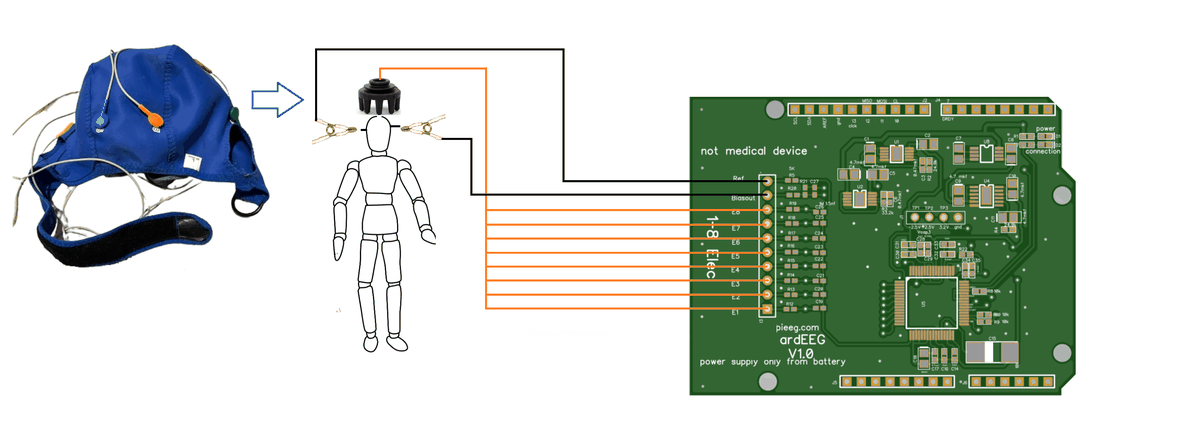
 Electrodes 1–8 ─┐
 Reference (ear) ┼─► ardEEG ──SPI──► Arduino UNO R4 ──Wi-Fi──► Python on
 Bias (ear) ─────┘   (ADS1299)       WiFi                       your computer
                                       ▲
             5 V power bank ───────────┘

The Arduino reads every sample over SPI, packs 50 samples into one UDP packet and sends it over Wi-Fi to a Python script on your computer.
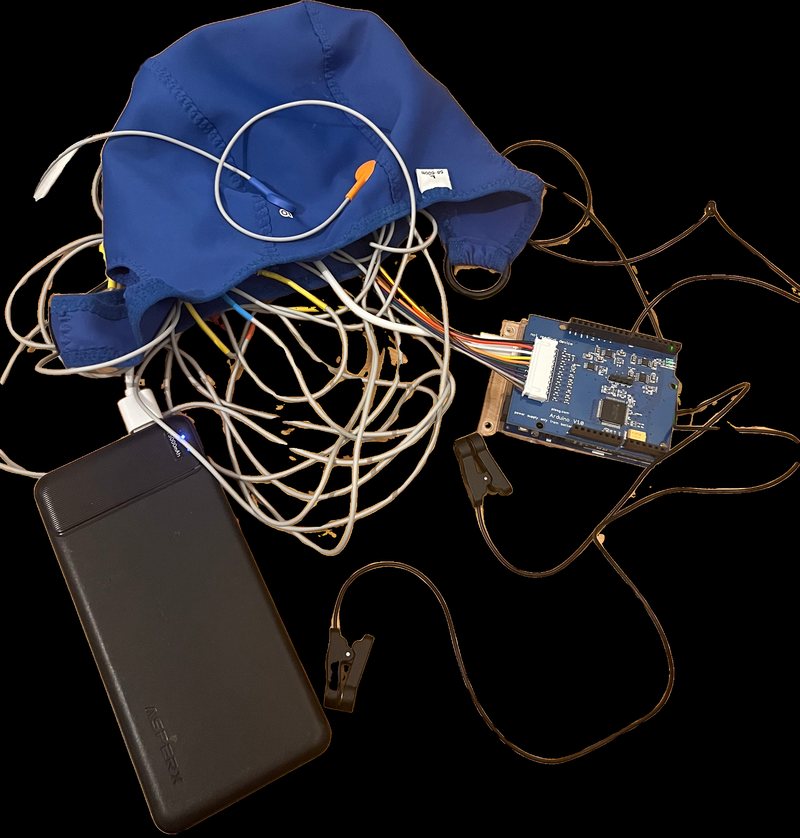
ardEEG kit: cap, shield on the Arduino, power bank

Quick start

  1. Find your computer's IP address on the Wi-Fi network (ipconfig on Windows → IPv4 Address). Example: 192.168.1.241.
  2. Edit the sketch software/arduino/1.Send_data_via_wifi.ino:
char ssid[] = "Wifi Name";                 // your Wi-Fi name (2.4 GHz)
char pass[] = "password";                  // your Wi-Fi password
...
udp.beginPacket("192.168.1.241", 13900);   // your computer's IP address
  1. Upload it with the Arduino IDE (board: Arduino UNO R4 WiFi), then unplug the USB cable.
  2. Mount the shield, connect 8 electrodes, a reference ear clip and a bias ear clip, and power the Arduino from the power bank.
  3. Run the receiver software/python/1.Alpha_real_time.py, with UDP_IP set to the same IP address:
pip install matplotlib scipy
cd software/python
python 1.Alpha_real_time.py

A window opens with 8 live graphs (8–12 Hz alpha band by default).

Important

The same IP address (your computer's) must be in the sketch and in the Python script, and both devices must be on the same 2.4 GHz Wi-Fi network.

Full walkthrough: docs.pieeg.com → ardEEG → How to Start

Wiring

Input Electrode Purpose
Channels 1–8 EEG electrodes in a cap (10-20 system) Signal
Reference Ear clip on one earlobe Common 0 µV point for all channels
Bias Ear clip on the other earlobe Cancels common-mode noise (mains hum)

ardEEG wiring: channels 1–8, reference and bias

Suggested positions: F7, Fz, F8, C3, C4, T5, Pz, T6.

Arduino pinout

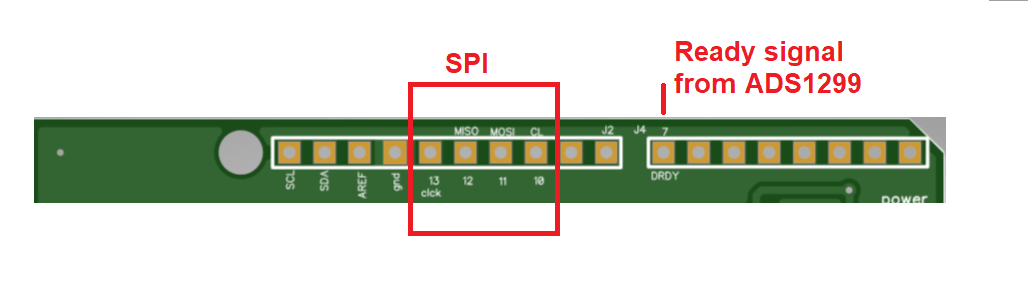
The shield uses only these pins, plus power and ground. All other pins are free for your own projects.

Arduino pin Signal
D13 SPI clock (SCK)
D12 SPI MISO
D11 SPI MOSI
D10 Chip select
D7 DRDY (data ready)

ardEEG pins on the Arduino headers

Software

File What it does
software/arduino/1.Send_data_via_wifi.ino Sets up the ADS1299, reads samples, sends 50-sample UDP packets over Wi-Fi
software/python/1.Alpha_real_time.py Receives packets, converts to µV, filters and plots 8 channels
software/python/speed_test_250_samples.py Checks the data arrives at the full 250 SPS

Change the filter: the receiver shows 8–12 Hz by default. For blinks and chewing, set highcut = 1 and lowcut = 40 near the top of the script (the two names are swapped; the values are the band edges).

Data format: each sample is 27 bytes (3 status + 8 channels × 3 bytes, 24-bit big-endian two's complement). Each UDP packet is 1,350 bytes = 50 samples. Details: Specification.
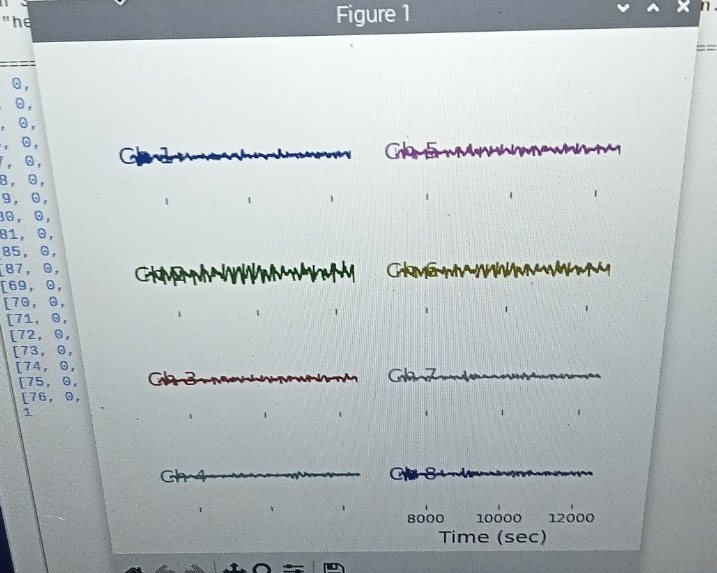
8 channels in the Python receiver

Example signals

EEG: alpha test (electrode at Fz, eyes closed and open, filtered 8–12 Hz) · dataset
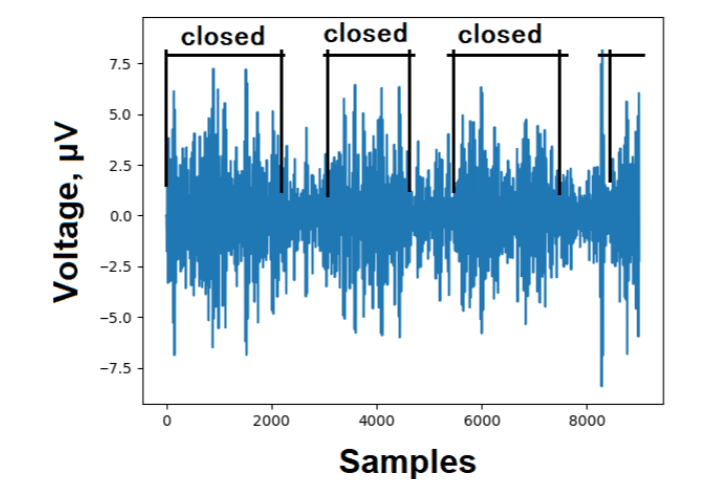
Alpha test with ardEEG

EEG: chewing and blinking (electrode at Fz, 4-3-2-1 times, filtered 1–40 Hz) · dataset
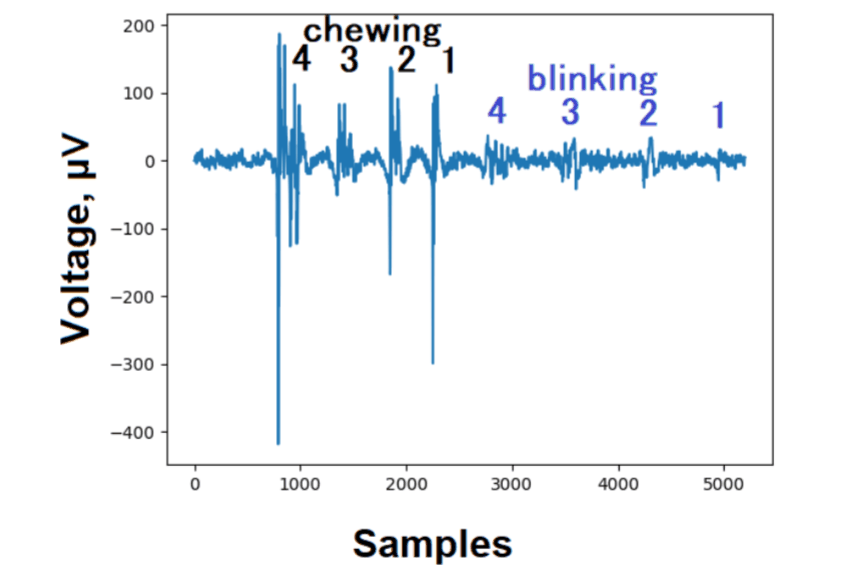
Chewing and blinking artifacts

Internal noise (about 0.5 µV RMS per channel) · dataset
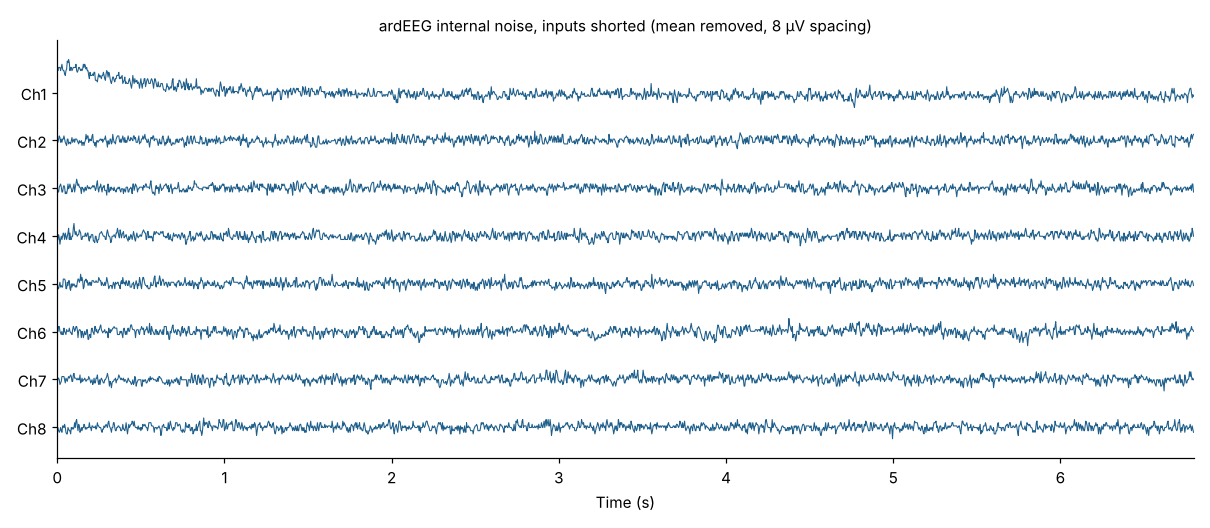
ardEEG internal noise on 8 channels

Where to use

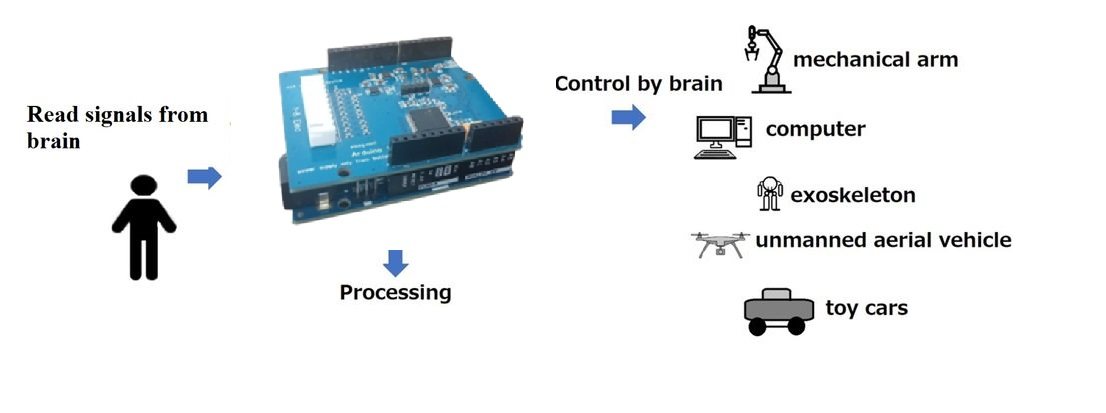
ardEEG applications: robotic arm, computer, exoskeleton, drone, toy car

Video

How to measure EEG with ardEEG

What's in this repository

Folder Content
software/arduino Arduino sketch (older versions in arxive)
software/python Real-time receiver and speed tests
dataset Alpha, artifacts and internal-noise recordings, with plotting scripts
doc Notebook: how to reduce noise during EEG measurement
supplementary_files Images used in the original README

Documentation

Page
ardEEG Intro Overview, comparison with PiEEG-8
What's in the Box What you need besides the shield
How to Start IP address, sketch upload, first signal
Electrodes & Pinout Wiring, montage, Arduino pins
Software Sketch, Python receiver, filter, speed test
Signals & Datasets Example recordings and datasets
Specification Data format, µV conversion, ADS1299 registers
Troubleshooting Upload, Wi-Fi, UDP and signal fixes
Safety Battery-only operation and responsible use

Also: Manual on Google Colab

Citation

If you use ardEEG in research, please cite:

I. Rakhmatulin. Low-Cost Shield ardEEG to Measure EEG with Arduino Uno R4 WiFi.
Preprints 2024, 2024051643. DOI: 10.20944/preprints202405.1643.v1

License

Software and SDK: MIT. Hardware use is subject to the terms in license.txt.

Contact

{
"by": "ron_87",
"descendants": 1,
"id": 40248368,
"kids": [
40248372
],
"score": 2,
"time": 1714748016,
"title": "ArdEEG shield for Arduino UNO R4 to measure EEG, EMG, and ECG bio-signals",
"type": "story",
"url": "https://github.com/Ildaron/ardEEG"
}
{
"author": null,
"date": null,
"description": "Arduino for measure EEG, EMG, and ECG bio-signals. Contribute to pieeg-club/ardEEG development by creating an account on GitHub.",
"image": "https://opengraph.githubassets.com/8258ea3c46bda50dd6eb8224dc999a487e70e6a8bbbed2065883e3a4a4914488/pieeg-club/ardEEG",
"logo": null,
"publisher": "GitHub",
"title": "GitHub - pieeg-club/ardEEG: Arduino for measure EEG, EMG, and ECG bio-signals",
"url": "https://github.com/pieeg-club/ardEEG"
}
{
"url": "https://github.com/pieeg-club/ardEEG",
"title": "GitHub - pieeg-club/ardEEG: Arduino for measure EEG, EMG, and ECG bio-signals",
"description": "WarningardEEG is not a medical device and has not been certified by any regulator for use with the human body. It cannot be used for any medical purpose. You use it at your own risk. CautionBattery only....",
"links": [
"https://github.com/pieeg-club/ardEEG",
"https://github.com/Ildaron/ardEEG"
],
"image": "https://opengraph.githubassets.com/8258ea3c46bda50dd6eb8224dc999a487e70e6a8bbbed2065883e3a4a4914488/pieeg-club/ardEEG",
"content": "<div><article>\n<div><p>Warning</p><p>ardEEG is <strong>not a medical device</strong> and has not been certified by any regulator for use with the human body. It cannot be used for any medical purpose. You use it at your own risk.</p>\n</div>\n<div><p>Caution</p><p><strong>Battery only.</strong> While electrodes are on a person, the Arduino and the shield run from a <strong>small 5 V power bank</strong> (up to 1 A, up to 1,000 mAh). Connect the Arduino to a computer only to upload the sketch, with no electrodes on anyone. The board has <strong>no isolation</strong>. Read the <a target=\"_blank\" href=\"https://docs.pieeg.com/hardware/devices/ardeeg/safety/\">Safety page</a>.</p>\n</div>\n<p></p><h2>At a glance</h2><a target=\"_blank\" href=\"https://github.com/pieeg-club/ardEEG#at-a-glance\"></a><p></p>\n<table>\n<thead>\n<tr>\n<th></th>\n<th></th>\n</tr>\n</thead>\n<tbody>\n<tr>\n<td><strong>Channels</strong></td>\n<td>8 biosignal inputs, plus reference and bias</td>\n</tr>\n<tr>\n<td><strong>Converter</strong></td>\n<td>TI ADS1299, 24-bit, simultaneous sampling</td>\n</tr>\n<tr>\n<td><strong>Sample rate</strong></td>\n<td>250 SPS</td>\n</tr>\n<tr>\n<td><strong>Internal noise</strong></td>\n<td>About 0.5 µV RMS per channel</td>\n</tr>\n<tr>\n<td><strong>Signals</strong></td>\n<td>EEG, EMG, ECG</td>\n</tr>\n<tr>\n<td><strong>Host</strong></td>\n<td>Arduino UNO R4 <strong>WiFi</strong></td>\n</tr>\n<tr>\n<td><strong>Link to the computer</strong></td>\n<td>Wi-Fi, UDP port 13900</td>\n</tr>\n<tr>\n<td><strong>Electrodes</strong></td>\n<td>Dry or wet Ag/AgCl, 2.54 mm header</td>\n</tr>\n<tr>\n<td><strong>Power</strong></td>\n<td>Small 5 V power bank: up to 1 A, up to 1,000 mAh</td>\n</tr>\n<tr>\n<td><strong>Software</strong></td>\n<td>Arduino sketch + Python script (this repo)</td>\n</tr>\n</tbody>\n</table>\n<p></p><h2>How it works</h2><a target=\"_blank\" href=\"https://github.com/pieeg-club/ardEEG#how-it-works\"></a><p></p>\n<div><pre><code> Electrodes 1–8 ─┐\n Reference (ear) ┼─► ardEEG ──SPI──► Arduino UNO R4 ──Wi-Fi──► Python on\n Bias (ear) ─────┘ (ADS1299) WiFi your computer\n ▲\n 5 V power bank ───────────┘\n</code></pre></div>\n<p>The Arduino reads every sample over SPI, packs 50 samples into one UDP packet and sends it over Wi-Fi to a Python script on your computer.</p>\n<p><a target=\"_blank\" href=\"https://raw.githubusercontent.com/pieeg-club/PiEEG-docs/main/public/images/hardware/2026/10/ardeeg_kit.jpg\"><img src=\"https://raw.githubusercontent.com/pieeg-club/PiEEG-docs/main/public/images/hardware/2026/10/ardeeg_kit.jpg\" alt=\"ardEEG kit: cap, shield on the Arduino, power bank\" /></a></p>\n<p></p><h2>Quick start</h2><a target=\"_blank\" href=\"https://github.com/pieeg-club/ardEEG#quick-start\"></a><p></p>\n<ol>\n<li><strong>Find your computer's IP address</strong> on the Wi-Fi network (<code>ipconfig</code> on Windows → IPv4 Address). Example: <code>192.168.1.241</code>.</li>\n<li><strong>Edit the sketch</strong> <a target=\"_blank\" href=\"https://github.com/pieeg-club/ardEEG/blob/main/software/arduino/1.Send_data_via_wifi.ino\"><code>software/arduino/1.Send_data_via_wifi.ino</code></a>:</li>\n</ol>\n<div><pre><span>char</span> ssid[] = <span><span>\"</span>Wifi Name<span>\"</span></span>; <span><span>//</span> your Wi-Fi name (2.4 GHz)</span>\n<span>char</span> pass[] = <span><span>\"</span>password<span>\"</span></span>; <span><span>//</span> your Wi-Fi password</span>\n...\nudp.beginPacket(<span><span>\"</span>192.168.1.241<span>\"</span></span>, <span>13900</span>); <span><span>//</span> your computer's IP address</span></pre></div>\n<ol>\n<li><strong>Upload</strong> it with the Arduino IDE (board: <strong>Arduino UNO R4 WiFi</strong>), then unplug the USB cable.</li>\n<li><strong>Mount</strong> the shield, <strong>connect</strong> 8 electrodes, a reference ear clip and a bias ear clip, and <strong>power</strong> the Arduino from the power bank.</li>\n<li><strong>Run the receiver</strong> <a target=\"_blank\" href=\"https://github.com/pieeg-club/ardEEG/blob/main/software/python/1.Alpha_real_time.py\"><code>software/python/1.Alpha_real_time.py</code></a>, with <code>UDP_IP</code> set to the same IP address:</li>\n</ol>\n<div><pre>pip install matplotlib scipy\n<span>cd</span> software/python\npython 1.Alpha_real_time.py</pre></div>\n<p>A window opens with 8 live graphs (8–12 Hz alpha band by default).</p>\n<div><p>Important</p><p>The <strong>same IP address</strong> (your computer's) must be in the sketch and in the Python script, and both devices must be on the <strong>same 2.4 GHz Wi-Fi network</strong>.</p>\n</div>\n<p>Full walkthrough: <strong><a target=\"_blank\" href=\"https://docs.pieeg.com/hardware/devices/ardeeg/setup/\">docs.pieeg.com → ardEEG → How to Start</a></strong></p>\n<p></p><h2>Wiring</h2><a target=\"_blank\" href=\"https://github.com/pieeg-club/ardEEG#wiring\"></a><p></p>\n<table>\n<thead>\n<tr>\n<th>Input</th>\n<th>Electrode</th>\n<th>Purpose</th>\n</tr>\n</thead>\n<tbody>\n<tr>\n<td><strong>Channels 1–8</strong></td>\n<td>EEG electrodes in a cap (10-20 system)</td>\n<td>Signal</td>\n</tr>\n<tr>\n<td><strong>Reference</strong></td>\n<td>Ear clip on one earlobe</td>\n<td>Common 0 µV point for all channels</td>\n</tr>\n<tr>\n<td><strong>Bias</strong></td>\n<td>Ear clip on the other earlobe</td>\n<td>Cancels common-mode noise (mains hum)</td>\n</tr>\n</tbody>\n</table>\n<p><a target=\"_blank\" href=\"https://raw.githubusercontent.com/pieeg-club/PiEEG-docs/main/public/images/hardware/2026/10/ardeeg_connection.png\"><img src=\"https://raw.githubusercontent.com/pieeg-club/PiEEG-docs/main/public/images/hardware/2026/10/ardeeg_connection.png\" alt=\"ardEEG wiring: channels 1–8, reference and bias\" /></a></p>\n<p>Suggested positions: <strong>F7, Fz, F8, C3, C4, T5, Pz, T6</strong>.</p>\n<p></p><h3>Arduino pinout</h3><a target=\"_blank\" href=\"https://github.com/pieeg-club/ardEEG#arduino-pinout\"></a><p></p>\n<p>The shield uses only these pins, plus power and ground. All other pins are free for your own projects.</p>\n<table>\n<thead>\n<tr>\n<th>Arduino pin</th>\n<th>Signal</th>\n</tr>\n</thead>\n<tbody>\n<tr>\n<td>D13</td>\n<td>SPI clock (SCK)</td>\n</tr>\n<tr>\n<td>D12</td>\n<td>SPI MISO</td>\n</tr>\n<tr>\n<td>D11</td>\n<td>SPI MOSI</td>\n</tr>\n<tr>\n<td>D10</td>\n<td>Chip select</td>\n</tr>\n<tr>\n<td>D7</td>\n<td>DRDY (data ready)</td>\n</tr>\n</tbody>\n</table>\n<p><a target=\"_blank\" href=\"https://raw.githubusercontent.com/pieeg-club/PiEEG-docs/main/public/images/hardware/2026/10/ardeeg_pinout.png\"><img src=\"https://raw.githubusercontent.com/pieeg-club/PiEEG-docs/main/public/images/hardware/2026/10/ardeeg_pinout.png\" alt=\"ardEEG pins on the Arduino headers\" /></a></p>\n<p></p><h2>Software</h2><a target=\"_blank\" href=\"https://github.com/pieeg-club/ardEEG#software\"></a><p></p>\n<table>\n<thead>\n<tr>\n<th>File</th>\n<th>What it does</th>\n</tr>\n</thead>\n<tbody>\n<tr>\n<td><a target=\"_blank\" href=\"https://github.com/pieeg-club/ardEEG/blob/main/software/arduino/1.Send_data_via_wifi.ino\"><code>software/arduino/1.Send_data_via_wifi.ino</code></a></td>\n<td>Sets up the ADS1299, reads samples, sends 50-sample UDP packets over Wi-Fi</td>\n</tr>\n<tr>\n<td><a target=\"_blank\" href=\"https://github.com/pieeg-club/ardEEG/blob/main/software/python/1.Alpha_real_time.py\"><code>software/python/1.Alpha_real_time.py</code></a></td>\n<td>Receives packets, converts to µV, filters and plots 8 channels</td>\n</tr>\n<tr>\n<td><a target=\"_blank\" href=\"https://github.com/pieeg-club/ardEEG/blob/main/software/python\"><code>software/python/speed_test_250_samples.py</code></a></td>\n<td>Checks the data arrives at the full 250 SPS</td>\n</tr>\n</tbody>\n</table>\n<p><strong>Change the filter:</strong> the receiver shows 8–12 Hz by default. For blinks and chewing, set <code>highcut = 1</code> and <code>lowcut = 40</code> near the top of the script (the two names are swapped; the values are the band edges).</p>\n<p><strong>Data format:</strong> each sample is 27 bytes (3 status + 8 channels × 3 bytes, 24-bit big-endian two's complement). Each UDP packet is 1,350 bytes = 50 samples. Details: <a target=\"_blank\" href=\"https://docs.pieeg.com/hardware/devices/ardeeg/specification/\">Specification</a>.</p>\n<p><a target=\"_blank\" href=\"https://raw.githubusercontent.com/pieeg-club/PiEEG-docs/main/public/images/hardware/2026/10/ardeeg_8ch.jpg\"><img src=\"https://raw.githubusercontent.com/pieeg-club/PiEEG-docs/main/public/images/hardware/2026/10/ardeeg_8ch.jpg\" alt=\"8 channels in the Python receiver\" /></a></p>\n<p></p><h2>Example signals</h2><a target=\"_blank\" href=\"https://github.com/pieeg-club/ardEEG#example-signals\"></a><p></p>\n<p><strong>EEG: alpha test</strong> (electrode at Fz, eyes closed and open, filtered 8–12 Hz) · <a target=\"_blank\" href=\"https://github.com/pieeg-club/ardEEG/blob/main/dataset/alpha\">dataset</a></p>\n<p><a target=\"_blank\" href=\"https://raw.githubusercontent.com/pieeg-club/PiEEG-docs/main/public/images/hardware/2026/10/ardeeg_alpha.png\"><img src=\"https://raw.githubusercontent.com/pieeg-club/PiEEG-docs/main/public/images/hardware/2026/10/ardeeg_alpha.png\" alt=\"Alpha test with ardEEG\" /></a></p>\n<p><strong>EEG: chewing and blinking</strong> (electrode at Fz, 4-3-2-1 times, filtered 1–40 Hz) · <a target=\"_blank\" href=\"https://github.com/pieeg-club/ardEEG/blob/main/dataset/artefacts\">dataset</a></p>\n<p><a target=\"_blank\" href=\"https://raw.githubusercontent.com/pieeg-club/PiEEG-docs/main/public/images/hardware/2026/10/ardeeg_artifacts.png\"><img src=\"https://raw.githubusercontent.com/pieeg-club/PiEEG-docs/main/public/images/hardware/2026/10/ardeeg_artifacts.png\" alt=\"Chewing and blinking artifacts\" /></a></p>\n<p><strong>Internal noise</strong> (about 0.5 µV RMS per channel) · <a target=\"_blank\" href=\"https://github.com/pieeg-club/ardEEG/blob/main/dataset/internal_noise\">dataset</a></p>\n<p><a target=\"_blank\" href=\"https://raw.githubusercontent.com/pieeg-club/PiEEG-docs/main/public/images/hardware/2026/10/ardeeg_noise.png\"><img src=\"https://raw.githubusercontent.com/pieeg-club/PiEEG-docs/main/public/images/hardware/2026/10/ardeeg_noise.png\" alt=\"ardEEG internal noise on 8 channels\" /></a></p>\n<p></p><h2>Where to use</h2><a target=\"_blank\" href=\"https://github.com/pieeg-club/ardEEG#where-to-use\"></a><p></p>\n<p><a target=\"_blank\" href=\"https://raw.githubusercontent.com/pieeg-club/PiEEG-docs/main/public/images/hardware/2026/10/ardeeg_applications.jpg\"><img src=\"https://raw.githubusercontent.com/pieeg-club/PiEEG-docs/main/public/images/hardware/2026/10/ardeeg_applications.jpg\" alt=\"ardEEG applications: robotic arm, computer, exoskeleton, drone, toy car\" /></a></p>\n<p></p><h2>Video</h2><a target=\"_blank\" href=\"https://github.com/pieeg-club/ardEEG#video\"></a><p></p>\n<p><a target=\"_blank\" href=\"https://youtu.be/s_5mDDUFp6E\"><img src=\"https://raw.githubusercontent.com/pieeg-club/PiEEG-docs/main/public/images/hardware/2026/10/ardeeg_video.jpg\" alt=\"How to measure EEG with ardEEG\" /></a></p>\n<p></p><h2>What's in this repository</h2><a target=\"_blank\" href=\"https://github.com/pieeg-club/ardEEG#whats-in-this-repository\"></a><p></p>\n<table>\n<thead>\n<tr>\n<th>Folder</th>\n<th>Content</th>\n</tr>\n</thead>\n<tbody>\n<tr>\n<td><a target=\"_blank\" href=\"https://github.com/pieeg-club/ardEEG/blob/main/software/arduino\"><code>software/arduino</code></a></td>\n<td>Arduino sketch (older versions in <code>arxive</code>)</td>\n</tr>\n<tr>\n<td><a target=\"_blank\" href=\"https://github.com/pieeg-club/ardEEG/blob/main/software/python\"><code>software/python</code></a></td>\n<td>Real-time receiver and speed tests</td>\n</tr>\n<tr>\n<td><a target=\"_blank\" href=\"https://github.com/pieeg-club/ardEEG/blob/main/dataset\"><code>dataset</code></a></td>\n<td>Alpha, artifacts and internal-noise recordings, with plotting scripts</td>\n</tr>\n<tr>\n<td><a target=\"_blank\" href=\"https://github.com/pieeg-club/ardEEG/blob/main/doc\"><code>doc</code></a></td>\n<td>Notebook: how to reduce noise during EEG measurement</td>\n</tr>\n<tr>\n<td><a target=\"_blank\" href=\"https://github.com/pieeg-club/ardEEG/blob/main/supplementary_files\"><code>supplementary_files</code></a></td>\n<td>Images used in the original README</td>\n</tr>\n</tbody>\n</table>\n<p></p><h2>Documentation</h2><a target=\"_blank\" href=\"https://github.com/pieeg-club/ardEEG#documentation\"></a><p></p>\n<table>\n<thead>\n<tr>\n<th>Page</th>\n<th></th>\n</tr>\n</thead>\n<tbody>\n<tr>\n<td><a target=\"_blank\" href=\"https://docs.pieeg.com/hardware/devices/ardeeg/\">ardEEG Intro</a></td>\n<td>Overview, comparison with PiEEG-8</td>\n</tr>\n<tr>\n<td><a target=\"_blank\" href=\"https://docs.pieeg.com/hardware/devices/ardeeg/required-equipment/\">What's in the Box</a></td>\n<td>What you need besides the shield</td>\n</tr>\n<tr>\n<td><a target=\"_blank\" href=\"https://docs.pieeg.com/hardware/devices/ardeeg/setup/\">How to Start</a></td>\n<td>IP address, sketch upload, first signal</td>\n</tr>\n<tr>\n<td><a target=\"_blank\" href=\"https://docs.pieeg.com/hardware/devices/ardeeg/connections/\">Electrodes &amp; Pinout</a></td>\n<td>Wiring, montage, Arduino pins</td>\n</tr>\n<tr>\n<td><a target=\"_blank\" href=\"https://docs.pieeg.com/hardware/devices/ardeeg/software/\">Software</a></td>\n<td>Sketch, Python receiver, filter, speed test</td>\n</tr>\n<tr>\n<td><a target=\"_blank\" href=\"https://docs.pieeg.com/hardware/devices/ardeeg/examples/\">Signals &amp; Datasets</a></td>\n<td>Example recordings and datasets</td>\n</tr>\n<tr>\n<td><a target=\"_blank\" href=\"https://docs.pieeg.com/hardware/devices/ardeeg/specification/\">Specification</a></td>\n<td>Data format, µV conversion, ADS1299 registers</td>\n</tr>\n<tr>\n<td><a target=\"_blank\" href=\"https://docs.pieeg.com/hardware/devices/ardeeg/troubleshooting/\">Troubleshooting</a></td>\n<td>Upload, Wi-Fi, UDP and signal fixes</td>\n</tr>\n<tr>\n<td><a target=\"_blank\" href=\"https://docs.pieeg.com/hardware/devices/ardeeg/safety/\">Safety</a></td>\n<td>Battery-only operation and responsible use</td>\n</tr>\n</tbody>\n</table>\n<p>Also: <a target=\"_blank\" href=\"https://colab.research.google.com/drive/1xW6fwzVdLH83zHoorjeWai6SdZoOanfA\">Manual on Google Colab</a></p>\n<p></p><h2>Citation</h2><a target=\"_blank\" href=\"https://github.com/pieeg-club/ardEEG#citation\"></a><p></p>\n<p>If you use ardEEG in research, please cite:</p>\n<div><pre><code>I. Rakhmatulin. Low-Cost Shield ardEEG to Measure EEG with Arduino Uno R4 WiFi.\nPreprints 2024, 2024051643. DOI: 10.20944/preprints202405.1643.v1\n</code></pre></div>\n<p></p><h2>License</h2><a target=\"_blank\" href=\"https://github.com/pieeg-club/ardEEG#license\"></a><p></p>\n<p>Software and SDK: <strong>MIT</strong>. Hardware use is subject to the terms in <a target=\"_blank\" href=\"https://github.com/pieeg-club/ardEEG/blob/main/license.txt\"><code>license.txt</code></a>.</p>\n<p></p><h2>Contact</h2><a target=\"_blank\" href=\"https://github.com/pieeg-club/ardEEG#contact\"></a><p></p>\n<ul>\n<li>🌐 <a target=\"_blank\" href=\"https://pieeg.com/\">pieeg.com</a></li>\n<li>📖 <a target=\"_blank\" href=\"https://docs.pieeg.com/\">docs.pieeg.com</a></li>\n<li>💬 <a target=\"_blank\" href=\"https://discord.gg/5Ps24p47\">Discord</a></li>\n<li>✉️ <a target=\"_blank\" href=\"mailto:[email protected]\">[email protected]</a></li>\n</ul>\n</article></div>",
"author": "",
"favicon": "https://github.githubassets.com/favicons/favicon.svg",
"source": "github.com",
"published": "",
"ttr": 158,
"type": "object"
}